
Download DeeKeep Deezer Music Converter – Fast, Free & Secure Music Downloader
Overview
DeeKeep Deezer Music Converter is a dedicated desktop utility that lets you download and convert tracks, playlists, and full albums from Deezer into high‑quality audio files you can keep forever. Designed as a complementary tool to Deezer’s streaming service, DeeKeep gives you the freedom to enjoy your favorite songs offline, whether you’re on a Windows PC, a macOS laptop, an Android tablet, or an iPhone. The application promises lightning‑fast download speeds—up to ten times faster than many competing converters—while preserving original ID3 metadata so your music library stays organized and ready for any device. Regular, free software updates ensure that DeeKeep remains compatible with Deezer’s ever‑evolving API, delivering a reliable, future‑proof solution for music lovers who want control over their audio collection. Whether you’re a casual listener who wants a few tracks for a road trip or an audiophile curating a massive offline library, DeeKeep offers a straightforward, secure, and completely free way to transform streaming into ownership.
Key Features & Benefits
- Ultra‑Fast Downloads: Leverages multi‑threaded technology to pull tracks from Deezer up to 10× faster than traditional downloaders.
- Multiple Output Formats: Convert songs to MP3, FLAC, WAV, AAC, and M4A, ensuring compatibility with any music player or device.
- Preserved ID3 Tags: Keeps title, artist, album, track number, and cover art intact, so your library stays perfectly organized.
- Batch Processing: Download entire playlists or album collections in a single click, with progress tracking and automatic file naming.
- Cross‑Platform Support: Fully compatible with Windows 10/11, macOS 10.14+, Android 6.0+, and iOS 12+, allowing you to sync music across all your devices.
- Free Updates: Receive regular, no‑cost updates that add new features, improve speed, and maintain compatibility with Deezer’s API changes.
- Secure & Ad‑Free: No hidden fees, no intrusive ads, and built‑in SSL encryption to protect your download sessions.
- Low System Footprint: Lightweight installer (under 30 MB) that runs smoothly on older hardware without sacrificing performance.
Installation, Setup & Usage Guide
Step‑by‑Step Installation
Downloading and installing DeeKeep is a breeze. Visit the official DeeKeep website, click the Download for Windows (or macOS, Android, iOS) button, and save the installer to your computer. Run the executable and follow the on‑screen prompts: accept the license agreement, choose an installation folder (the default works for most users), and let the wizard finish copying files. The entire process typically takes less than two minutes.
Initial Configuration
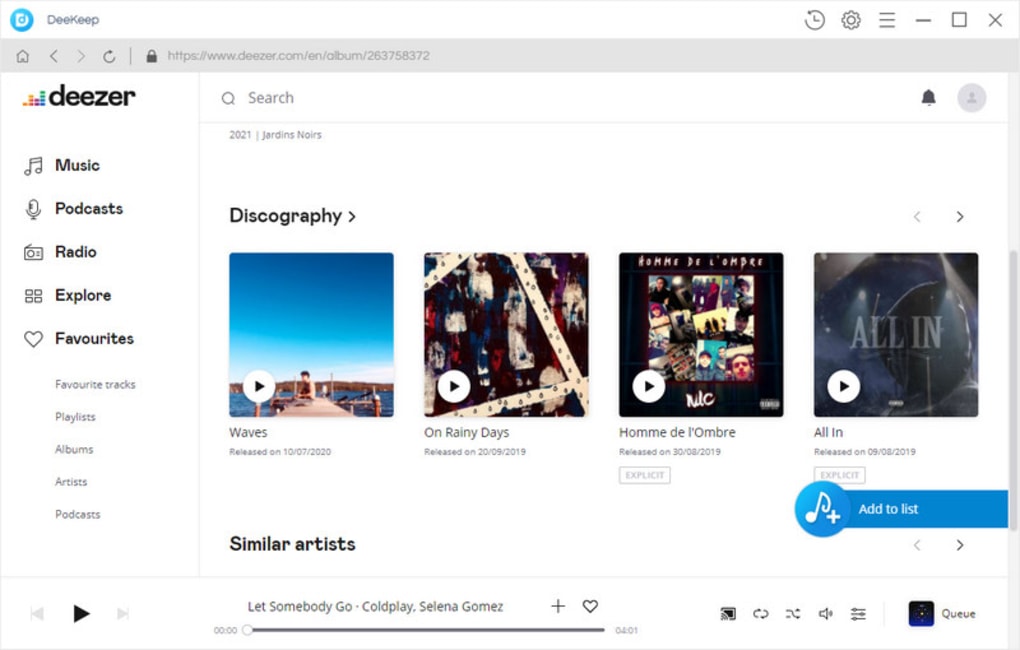
After launching DeeKeep for the first time, you’ll be greeted by a clean dashboard. The software asks you to sign in with your Deezer credentials—this is required to access your personal library and playlists securely. Your login information is encrypted locally and never stored on external servers, ensuring privacy.
Downloading Music
To start downloading, simply copy the URL of a Deezer track, playlist, or album and paste it into the “Enter Deezer URL” field. Choose your desired output format from the drop‑down menu, set a destination folder, and hit the Download button. DeeKeep will display real‑time progress bars, estimated time remaining, and will automatically embed ID3 tags once conversion completes.
Batch Conversion & Automation
For power users, DeeKeep offers a “Batch Mode” where you can import a text file containing multiple URLs. The application will queue each item, applying the same output settings across the entire batch. You can also schedule automatic updates to keep the software current without manual intervention.
Troubleshooting Common Issues
If a download stalls, verify that your internet connection is stable and that Deezer isn’t experiencing service outages. The built‑in log viewer (accessible via the Settings menu) provides detailed error messages that can be sent to DeeKeep support for rapid assistance. In most cases, restarting the application resolves temporary glitches.
Compatibility, Pros & Cons, and Frequently Asked Questions
Supported Operating Systems: Windows 10/11, macOS 10.14 and later, Android 6.0+, iOS 12+.
Pros
- Lightning‑fast download speeds with multi‑threaded engine.
- Free, ad‑free experience with regular updates.
- Extensive format support ensures playback on any device.
- Accurate ID3 tag preservation keeps libraries tidy.
- Simple, intuitive UI suitable for beginners and pros.
Cons
- Requires a valid Deezer subscription to access premium tracks.
- No built‑in audio editing tools (e.g., trimming or volume normalization).
- Batch mode currently limited to 100 URLs per session.
FAQ – Your Questions Answered
Is DeeKeep really free?
Yes, DeeKeep is offered as a completely free download with no hidden fees or subscription charges. All features, including batch downloads and format conversion, are available at no cost.
Do I need a Deezer Premium account?
A standard Deezer account works for public tracks, but to download and convert premium‑only songs you’ll need an active Deezer Premium subscription. The software respects the same licensing rules as Deezer itself.
Can I convert songs to lossless formats like FLAC?
Absolutely. DeeKeep supports FLAC, WAV, and other lossless formats, allowing you to preserve the original audio quality when converting Deezer streams.
Is my personal data safe during the download process?
DeeKeep uses SSL encryption for all communications with Deezer’s servers, and your login credentials are stored only locally on your device. No data is transmitted to third‑party servers.
How often are updates released?
The development team pushes free updates roughly every 4–6 weeks, covering new features, performance enhancements, and compatibility fixes for Deezer’s API changes.
Overall Rating: 4.5 out of 5 stars – DeeKeep delivers on its promises of speed, quality, and ease of use, making it a top choice for Deezer enthusiasts.
Conclusion & Call to Action
DeeKeep Deezer Music Converter stands out as a fast, secure, and completely free solution for anyone looking to take control of their Deezer library. By offering multi‑format conversion, reliable ID3 tag preservation, and regular updates, it eliminates the biggest pain points of streaming‑only services—namely, offline access and device compatibility. Whether you’re a casual listener planning a weekend getaway or an audiophile building a high‑fidelity collection, DeeKeep provides the tools you need without any hidden costs or intrusive ads. Ready to enjoy your favorite tracks anytime, anywhere? Download DeeKeep now and start converting your Deezer music in minutes.







